My Tech Safety Plan – a step-by-step guide

You can support children and young people experiencing tech-based domestic and family violence by helping them fill out a tech-safety plan developed by eSafety. Use the information on this page to guide you in doing this.
Children and young people who experience technology-facilitated abuse (tech-based abuse) need validation and support. Often, they are only seen as an extension of their parent or carer in safety planning, but they are victim-survivors with very different online safety needs.
The information on this page will help you to effectively support children and young people to actively participate in their online safety planning and contribute to decisions that affect their lives.
On this page:
- What is My Tech Safety Plan?
- What will following the step-by-step guide help me achieve?
- How do I use it?
- Things to keep in mind
- Step 1 Set up for success
- Step 2 Investigate, understand, support
- Step 3 Assess the child's environment
- Step 4 Explore their online world together
- Step 5 Online safety strategies
- Step 6 Review support networks
- Step 7 Reflection
- Download
- Explore our resources
What is My Tech Safety Plan?
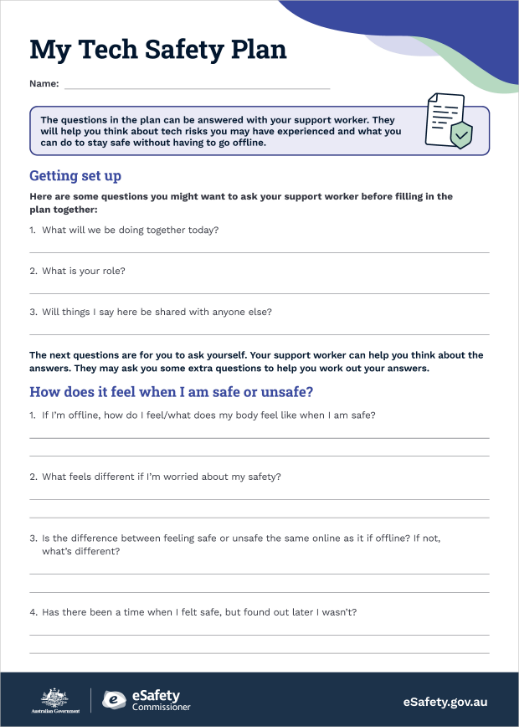
‘My Tech Safety Plan’ (also called ‘the plan’) is a set of questions that you can help children and young people answer as a way of developing preventative online safety strategies that work for them. You can find it on this page.
The plan is for children and young people at risk of, currently experiencing or previously subjected to technology-facilitated abuse as part of domestic and family violence. (Calling this ‘tech-based abuse’ is an easier term for people to understand.)
Ideally, you should do the assessment and planning with them directly, but you may have to work indirectly through a parent, carer or other support worker.
Deciding on the most appropriate answers is not necessarily a simple process. There can be a lot to explore with the child or young person first, such as:
- understanding where they might be most vulnerable to tech-based abuse
- exploring their technology safety considerations
- identifying the help-seeking strategies they need to support overall safety planning.
You can use the step-by-step guide to prepare for the conversation, identify and discuss the issues they are experiencing and find ways to deal with them. It is important to make notes as you go through the steps. They will support you and the child or young person to fill out their plan.
The guide also ensures that the child or young person filling out their plan is at the centre of the decisions that affect them in a domestic and family violence situation – taking into consideration their unique experiences, risks, strengths and protective factors in the context of online safety.
How we talk about children and families
Throughout eSafety’s website and resources we use ‘families’ and ‘parents and carers’ to talk about the adults who support children. When we use these terms, we include the mums, dads, parents, carers, aunties, uncles and other supportive adults who we know can have an important role in helping children play, learn and grow.
When we talk about ‘children’ we mean everyone under 18 years old. Sometimes we include the term ‘young people’ because many teenagers don't like to be called children.
What will following the step-by-step guide help me achieve?
- Help the child or young person understand how technology and the internet can offer supportive spaces but may also be misused by an abuser (sometimes referred to as ‘the person using violence’).
- Support the child or young person to assess their technology use and identify risks they may face in online spaces.
- Guide them through strategies to reduce risks and navigate these spaces more safely, where possible.
- If safe and reasonable to do so, support the child or young person to make changes to their device use and online settings as part of their safety plan.
- Help the child or young person learn skills and strategies to remain safer online and limit the abuser’s ability to digitally harass, track or control them.
The framework allows you to remain flexible, curious, empathetic and non-judgemental, as well as being guided by the child or young person about what is important to them for their specific tech and online safety plan.
In each step you will find:
- talking points
- consideration of the circumstances and needs of children and young people
- prompts and actions you can take together to tailor a comprehensive tech and online safety plan.
Remember: Evaluate whether it is appropriate, safe and reasonable to proceed, especially if changes to the person’s online use could lead to further risk of violence.
Following the steps will help inform a broader risk assessment, safety planning and ongoing support provided to the child or young person. It’s best to review them alongside the safety and care policies and procedures of your organisation, service or practice. You may also wish to refer to the National Risk Assessment Principles for domestic and family violence provided by Australia’s National Research Organisation for Women’s Safety (ANROWS).
The step-by-step guide can also serve as a professional development resource, helping support workers to:
- deepen their understanding of the way young people use tech, online services and platforms
- identify where children and young people are vulnerable to tech-based abuse within domestic and family violence.
How do I use it?
Children have a right to participate in decisions and processes that affect them. Where appropriate, it is best to engage directly with the child or young person. If a protective parent or carer is also part of the discussion, it is important to make sure the child remains at the centre of their own planning.
Why is direct engagement with the child or young person a priority?
- Direct engagement empowers them by recognising they should have a say in what is happening to them.
- It allows them to share their unique experiences of how online abuse happens in their life and how the harms impact them.
- Exploration of their own online safety strategies also allows them to share what works well for them, so they are more likely to feel ownership of the plan and follow it.
Indirect engagement
- When direct discussion with the child isn’t possible engage sensitively and non-judgementally with the protective parent or carer (who is often an adult victim-survivor).
- Ensure you’re still gathering insights and considering the child’s needs in planning their online safety. Where safe and appropriate, support the protective parent or carer to talk with their child about the child’s needs, and advocate for the child in their online safety planning.
- If the child is already working with a care worker or another youth serving worker, it may be best for that person to use these resources with the child or young person. In some cases, you may need to collaborate with others in the child’s support network (for example, teachers, counsellors). This approach helps minimise the number of people directly working with a child, who may be experiencing trauma and find it hard to engage or build trust.
Things to keep in mind
As you work through each step, you may find that developing the plan with the child raises difficult issues and emotions for them. It’s essential to listen, validate and reassure the child that the abuse they’ve experienced is never their fault. You should select and adapt the most appropriate questions and conversation topics for the child’s situation. Part of your role is to identify the biggest risks and the safety strategies required in response.
Consider the child’s specific needs, keeping your language and approach aligned culturally and with their comfort level.
Some children and young people may not identify with terms like ‘violence’, ‘abuse’, or ‘abuser’ so it’s crucial to tailor conversations using language that is accessible and relevant to their experience. It may help to use the same language you are hearing from them when referring to the people and situations they describe.
If you are documenting the child’s safety plan physically or electronically, carefully consider where it is safe to store this documentation. While it will be important for you to refer to with the child later, it may not be safe for them to keep a copy if it is likely to be found by an abusive parent.
Child-centred principles and practises
- Prioritise ensuring the child or young person’s voice is heard and respected throughout the process.
- Consider the child or young person’s age and stage of development.
- Remind the child that they are not to blame for their abuse and that they are not being punished for using technology.
- Encourage a positive, proactive review of their online safety, reinforcing that safety planning is a way to strengthen their security and empower them to make safer decisions.
- Help the child or young person understand that abuse can happen online or offline. When someone uses technology to harass, intimidate, threaten or harm a child or young person, that is abuse and their experience of it is real and valid.
- Ensure you have the informed consent of the child or young person before helping them to fill out ‘My Tech Safety Plan’. This means that the child or young person understands what it is for and how you will use it together. Depending on the age and maturity of the child or young person, you may consider talking about what information you might collect and how it will be stored. You may also need to mention your organisation’s privacy policy.
- Help the child or young person understand the actions you might take in response to information or worries they share including any mandatory reporting obligations you have and what that means for the child or young person. This is an important element of informed consent.
In accordance with Australian Privacy Principles, children and young people may wish to access information you have stored about them. However, carefully consider with the child or young person whether it is safe for them to have a copy of this information if they request it.
The child’s environment
- Remember that online and offline environments may evolve and change, particularly within domestic and family violence situations, so your discussions may need to take this into account.
- If you are working with a child who has a protection order or is required to use technology to communicate with the abuser, ensure the tech safety plan meets the requirements. It is important that you and the young person fully understand the guidelines of any legal orders in place.
- While the focus is on the child you’re working with, consider the potential involvement of siblings in the safety planning when necessary, and look for opportunities to develop individual plans with them.
- Always consider the implications of changing a child’s use of digital devices and online spaces if tech-based abuse is happening, as it may lead to an escalation in violence.
Intersecting issues
Online spaces and digital technologies have given abusers new opportunities to cause harm which contributes to the pattern of behaviour known as coercive control. When this happens online it is a type of tech-based abuse.
Experiencing tech-based abuse as part of domestic and family violence may also impact the child’s online safety in other ways. For example, if a teenager is used to being under an abusive level of surveillance from a parent, they may accept unhealthy controlling behaviours from someone they’re dating.
Timing
‘My Tech Safety Plan’ will need to be worked through in several sessions. However, it is important that the child’s concerns are addressed promptly, even if that means recommending short-term solutions until the plan is completed.
Your support and self-care
eSafety’s Technology-Facilitated Abuse Support Service enquiry form gives frontline workers access to advice on helping their clients manage the technical aspects of online safety.
Take time to think about your own wellbeing. Being exposed to online abuse and its impacts, even indirectly, is challenging. You do not need to face it alone – there are counselling and support services available to help.
Step 1 Set up for success
This step prepares you and the child for the journey ahead. Before starting any assessment and plan, it is recommended that you take time to learn how devices and online connections can be used as a means of abuse, especially as part of family and domestic violence. This knowledge will support your role in guiding the child or young person in how they plan for their online safety.
The child or young person's 'My tech Safety Plan' includes questions for them to consider. These are to prompt their reflections and give structure to the plan. If the child refers to specific questions, this may be a good indicator of what is important to them. However, the child may not have answers to all the questions in the ‘My Tech Safety Plan,’ so let them know it is OK to leave some of them blank, because they can always come back to them together later, having had time to think.
Click or tap on the + to find out more.
Prepare yourself
- Before engaging with a child or young person, make sure you understand the mandatory reporting requirements in your state or territory. See the Australian Institute of Family Studies for more information.
- Reflect on the positive aspects of technology and being online.
- Remember that you are there to help the child or young person stay online more safely and want to ensure that they can preserve as many of the benefits of being online as possible. This not only helps build rapport with the child or young person but fosters a sense of trust. Failing to build trust prior to safety planning can undermine the process.
- Talk with them about how they use their devices, apps and accounts.
- Make sure they understand any secrecy can negatively impact safety planning, potentially placing them and their family at further risk.
Prepare the child you’re supporting
- Remind the child or young person that their safety is the top priority.
- Explain the importance of confidentiality.
- Explain mandatory reporting obligations in your state or territory so that children and young people understand what your obligations are.
- Make sure the child or young person knows that if you are required to make a mandatory report, you will help them understand what you are doing and what will happen next, and you will still be there to support them.
- You can use age-appropriate language, such as ‘If you tell us that you or your family aren’t safe or that you’ve been hurt, then we may need to do something about it to keep you safe. This might mean sharing information about your situation with the police or child protection services if you are in danger.’
- Check their understanding by asking them to tell you what you’ve said in their own words. They may say something like ‘You might have to tell someone else if you’re worried about me or think that I’m unsafe.’
- Check with the child to see if they have any more questions about you or the process. They may want to ask you some of the suggested questions from the ‘Getting set up’ section of the plan.
Step 2 Investigate, understand, support
Refer to ‘How does it feel when I am safe or unsafe?’ in the plan when doing this step.
You don’t need to fill in the plan yet. Focus on the conversation with the child and take notes of what they tell you so you can fill in the plan with them later.
Firstly, explore the concept of safety. Then you can investigate and better understand the social, emotional, psychological and physical impacts of tech-based abuse on the child.
Click or tap on the + to find out more.
Explore what safety means
Children and young people don’t always recognise that they are unsafe, even when they are in a harmful situation. On the other hand, adults may perceive children are safe even though the child does not feel safe.
It is important to check in with the child about their feelings and worries. Identifying and naming those feelings and worries early will help you understand their experiences and talk about their issues. When it comes to safety, it’s also important to talk about different levels of feeling – for example, what it’s like when they feel unsure, compared to when they’re uncomfortable, compared to when they feel unsafe.
To help them describe unsure, uncomfortable, and unsafe feelings you may need to use terms that help the child express themselves. For example: weird, gross, creepy, creeped out, scary, hurtful, mean, nasty, confused, distressed, fearful, angry, sad, sick, icky, yucky, funny, freaked out, awkward, uncomfortable, anxious, stressed, tired, worried, ashamed, embarrassed, and guilty.
Keep in mind the child might recognise some feelings as physical sensations, such as feeling sweaty or shaky. Other times, they may feel an emotional response without physical signs.
Also, some unsafe situations can start off feeling new and exciting – for example, when an adult asks a child or young person to keep a secret. The child might feel safe and included at first, before becoming anxious or shamed.
Reassure the child or young person:
- Remind them they can use the ‘feeling’ words you talked about as you work through the plan together. Remember to let them express their emotions fully before moving on.
- Stress that it’s OK to have feelings that are mixed or confusing.
- Make sure the child knows that even if they started off feeling good about a situation, it’s never their fault if it became harmful.
To focus on what online safety means to the child you can use questions such as these:
- What does safety mean to you? Is it a feeling in your mind or body? Or is it a place or person?
- Does it feel different online to offline?
- What does safety look like when you are online or using devices?
- How do you know if you are in an unsafe situation online?
- What do you feel like when you are safe ? When you are unsafe, what feels different? Does this change when you are online?
- When people are unsure, uncomfortable or unsafe they sometimes feel it in their body. Can you think of how it might feel in your body?
- What online risks are you worried about when using devices?
- (If they identify a feeling or worry) What does that word mean to you? Have you ever felt this way when you’re online?
Investigate the positives and negatives of being online
Use your discoveries so far to discuss what using devices and being online is like for the child. It’s a good idea to use the language the child used when you explored what safety means.
Positives: What makes you feel happy about using devices or being online?
Prompt with ideas or questions:
- Who do you connect with online?
- Are there people you connect with online who make you feel good about yourself?
- What type of content do you enjoy watching, reading, listening to or playing?
Negatives: What makes you feel worried or unsafe about using devices or being online?
Prompt with ideas or questions:
- Has anyone ever tricked you or pretended to be someone you knew online?
- Does anyone message you all the time or get angry if you do not reply to them?
- Does anyone know where you are, even if you haven’t told them?
- Has anyone threatened to post or say things about you that are not true online if you don’t do what they say?
- Do you have any worries about your social media accounts?
- Does anyone make you share your devices or accounts with them?
- What would make you feel like you want to withdraw from online activity?
Explain tech-based abuse
When discussing tech-based abuse, it's important children feel they have a good understanding of the issue. Explain it in simple language and encourage them to ask questions and clarify any concerns (and remember they may have concerns that don’t occur to you).
- It may be helpful to help the child read through eSafety’s page for young people about family violence, to increase their awareness of tech-based abuse and let them know that other people experience it too. Make sure you are familiar with the material beforehand and consider whether it is appropriate for the child’s maturity and understanding.
- If appropriate for their age and experience, you can also show them eSafety’s case study videos and talk about the stories in eSafety’s conversation tool.
- Provide examples of tech-based abuse. For example, a parent or carer may:
- call or message the child all the time to check what they’re doing
- unfairly stop them using their phone or computer to chat with others
- log into their accounts without permission
- find out where they are through tracking and monitoring phones or computers
- say things on social media that make the child sad, scared , embarrassed or shamed.
Reassure the child that even though there are risks, technology has many benefits, including staying connected to our communities. It can often be a lifeline to safety and support. That’s why it’s important to work out how they can use digital devices and online spaces as safely as possible.
Step 3 Assess the child’s environment

Refer to ‘What’s happening in my life online?’ in the plan when you're doing this step.
Explore the relationships and other environmental factors that may support or be a barrier to the child or young person’s online safety. For children and young people, their online and offline experiences are often interconnected, so consider how each may impact the other.
It’s especially important to explore how the use of digital devices and online spaces may make a child more vulnerable in a domestic and family violence situation.
For example, you may need to consider whether the tech-based abuse they experience at home also impacts them at school, if the parent or carer keeps harassing them throughout the day. Or whether there’s a risk that the child will be contacted by a violent parent through a chat group used by their sporting club.
Refer to the discussions with the child in previous steps – and any notes you made – to help the child decide on their answers in their plan. It may be helpful to first consider a broader range of issues with them.
General questions to ask:
- Which offline or online spaces or relationships make you feel safe?
- Do any offline or online spaces or relationships make you feel worried or unsafe? Which ones? What makes those feel worrying or unsafe?
- What would help you feel safer?
- What might make you think someone might be harming you through your technology?
- What worries you about your privacy or security online? For example, taking or sharing photos or videos without your consent?
- What worries you about any other family members and their technology use?
Click or tap on the + to find out more.
Relationships with family and friends
Be careful to discuss the behaviours the child is exposed to by their parents or carers without assuming one is always abusive while another is always protective. Keep in mind that domestic and family violence can affect the way that victim-survivors parent. Sometimes it leads to harmful discipline, unhealthy coping behaviours, or overly protective actions which can become coercive control and further harm the child.
- Who are safe people in their life? (For example, trusted adults like protective parents or carers.)
- Is there anyone in their life making them feel scared, fearful or unsafe, especially in online environments? (Use the words the child or young person identified earlier to guide this conversation.)
- Does a parent or carer unfairly supervise, monitor or place limits on their online activities (such as the time they spend online or the sites they access)?
- Does the child feel they have to monitor or report on the actions or location of other family members?
- Does the child or young person move between different homes? Are they experiencing unstable housing? (Understanding this can help identify how devices may be misused, such as through tracking or sharing sensitive information.)
If the child or young person lacks a protective or supportive relationship with at least one parent or carer, they may turn to peers for support. It’s essential to explore the role of friends in this context, to check whether they could have a positive or negative impact online and offline.
Remember: for older children, the experience of domestic and family violence can impact their online safety in terms of their own romantic or sexual relationships. For example, if they’re used to being under an abusive level of surveillance from a parent, they may accept unhealthy controlling behaviours from someone they’re dating.
Online communities for connection
- Does the child’s exploration of their identity or activities, hobbies or interests influence their online experiences? (For example, the child may be involved in online chats associated with sports, clubs, religion or gender identity).
- How does the child interact with those online communities and what are the potential risks or support they find there?
- If online communities are an important source of support for the child or young person, what are safe ways they can continue to engage with them?
- If it’s not safe for the child or young person to continue engaging with online communities, what are alternative sources of support?
Study and employment
Investigate how school life (or further education or work, for an older child) may impact their online safety.
It is important to ask groups such as school, clubs and work to avoid posting photos or information about the child or young person online without prior permission from their protective parent or carer. Where possible, children and their protective parent should be included in these conversations or made aware that they are happening.
Other questions to consider include:
- Do they need to use digital devices, apps or accounts for their studies or work? For example, they may collaborate in shared documents for a group assignment or use a group chat for their roster.
- How do they contact and interact online with peers or co-workers?
- Does anyone at school or work make them feel safe or unsafe?
- What do they know about their rights at work? How might these apply online? (For example, young people are at higher risk of sexual harassment and abuse in the workplace.)
Other intersecting factors
eSafety research found that two thirds (67%) of children experiencing tech-based abuse in domestic and family violence situations suffered mental ill health as a result, including depression and suicidal thoughts. Poor mental health may be a significant factor in a child’s online safety, as it can impact how much time they spend online, their online activities, and their vulnerability to harm online. Other factors may influence or compound their vulnerability, such as disability, ethnicity or gender identity.
- Does the child or young person’s mental health affect when they go online, or the online activities they participate in? Do their online activities change with good or poor mental health?
- Does the child or young person’s physical or mental health restrict their offline socialisation or activities? Does this lead to a deeper reliance on online connections?
- Are there disability or health issues that may influence the child’s online behaviour or safety?
- Is the child or young person’s online access restricted due to a disability?
- Has the child or young person been abused online because of their disability?
- How may culture and identity influence the child’s online behaviour or safety?
- Has the child or young person been abused online due to their culture or identity (such as their ethnicity, religion or gender identity)?
Assess immediate risks to the child or young person via their online devices
Having been through the child or young person’s feelings and worries, their use of devices online and environmental factors, you are now in a better position to assess whether the child or young person is experiencing tech-based abuse or at risk of it.
It is important to acknowledge that a child or young person may feel situations are acceptable because they trust the person involved. For example, they may rationalise constant messaging or sharing passwords as care and trust in a relationship. These may seem normal or even positive but could be signs of controlling or harmful behaviour.
Use these examples to prompt discussion if safe and reasonable to do so:
- ‘Does anyone ever block or restrict your communication with others by claiming the technology is not working or that you’re unavailable?’
- ‘Do you sometimes feel you need to keep your conversations with anyone secret or share information that you or someone in your family don’t want them to know?’
- ‘Do you ever have video calls where your background may allow an unsafe person to guess where you are? Are there safer spaces you could use that would give the unsafe person less information?’
Step 4 Explore their online world together
Refer to ‘How do I use my devices, apps and accounts?’ in the plan for this step.
Carry out a scan with the child to get a picture of how and when they use devices, apps and accounts. This builds awareness of their online engagement and becomes the foundation of the risk assessment. It also helps identify the areas where they may be most vulnerable to tech-based abuse such as digital tracking, harassment by text or phone calls, or blocking communication.
The conversation might start more generally, covering the things the child likes to do online, and what they know about online safety – for example, what information is collected about them and when? Then you might move onto risks and new safety strategies.
Reminder: As you discuss these questions, check in with the child about their feelings and worries, and note down if any of the experiences they share raise feelings of being unsafe.
Click or tap on the + to find out more.
Count and name devices that can connect online
Ask them to identify and list the devices that they have access to or that are in their physical environment (such as their home). This includes:
- mobile phones
- tablets, laptops and computers
- gaming devices
- wearables, smart watches and fitness trackers
- location trackers (for example, Airtags or SmartTags)
- mobility aids and assistive technology
- bluetooth headphones and speakers
- smart home devices (for example, smart TVs and robot vacuum cleaners)
- smart toys
- security cameras or doorbells
- drones.
Check if they’ve been given any new items
If the child has received any new devices, toys, bags or even clothes, check what they were and where are they now.
Let the child know that devices like phones and tablets can be set up to secretly track the people who use them. Other items like toys, bags and clothes can be used to hide small tracking devices and cameras.
Encourage them to communicate with both parents about any devices or other items that move between homes. It is especially important if the abusive parent insists, they take something new with them when they return to their other parent or carer, because this may not be safe.
Explore their apps and online accounts with them
Ask them questions like:
- What apps do you like to use most?
- Which social media, messaging apps or other platforms with chat (such as online games) do you use? (Remember to include any restricted platforms they use, even if they are underage.)
- Have you heard of or used apps with AI, or AI companions? Which ones? (Note that if a child is sharing sensitive information with an AI companion or chatbot, this could be discovered by an abuser if they have access to the child’s device or accounts.)
- Are there any online communities you connect with? For example, these could be around hobbies, fandoms or cultural groups.
- Do you play games online or live stream? Which games do you play/stream?
- Which streaming services do you use to watch movies or TV series?
- Do you connect to wi-fi at home or use mobile data?
Explore what information is being shared and who has access to their devices and accounts
Sharing devices and accounts is common and may be normal in many relationships and households. For example, when a child receives their first phone, a parent may set up location sharing apps or adjust privacy settings, or a young person may want to share their location with friends. However, information sharing and account access may be misused by a parent or carer as part of domestic and family violence.
Open and ongoing conversations are crucial to ensure the child understands who can see their information and access their accounts – and how and when that happens. Explain that location sharing features and access to devices and accounts may allow someone to:
- find out information that may need to be kept private, such as where the child and other parent live
- add spyware and tracking apps (even ones that are sometimes used by parents to make sure their kids are OK may be misused to monitor them secretly)
- change the child’s account settings such as privacy and parental controls, so that person can keep getting information and access.
Ask questions like these:
- Who controls your wi-fi access and internet access?
- Are your online accounts set to public or private? Do you know how to change your privacy settings?
- Do you have family sharing, parental control settings or screen time limits enabled? Were these added with or without a conversation with you, to get your agreement?
- Do you share your location with your parent/s or carer/s (or anyone else) using any apps? (For example, via Google Maps, Apple Maps, Life360, Findmykids, Find My Device, Pingo, Snapchat or Strava).
- Do you share any devices with your family or friends?
- Do you allow your family or friends to log into your accounts (for example, social media, online gaming)? Or is it possible that someone has access to these?
- Have you ever noticed your accounts were used by someone else, either with or without asking you?
- Do you have passcodes or PINs on your devices or accounts and would others know them?
- Has anyone ever made you unlock your phone or other devices for them?
- Did you set up your accounts or did someone else?
If you and the child identify an online safety risk or issue, there may be an opportunity to address it if safe to do so. The eSafety Guide can help you explore privacy settings and reporting options for various social media platforms, games, and apps together and what risks they may have. You can also check out our Online tools and features section. (Please note this is not an exhaustive list).
Step 5 Online safety strategies

Refer to ‘What do I do if I feel unsafe online?’ and ‘New strategies for my online safety’ in the plan when doing this step.
Use the information you gather in this step to focus on the strategies the child can use to make themselves safer while using digital devices and being online. The goal is to empower the child or young person by acknowledging their strengths and resilience, while also offering them the tools and strategies to stay safer in their online environments.
Click or tap on the + to find out more.
Explore existing online safety strategies
Children and young people often have their own unique ways of perceiving safety that may not always be acknowledged by adults. They also have varying levels of digital literacy compared to adults.
Use these questions to explore and acknowledge their existing online safety strategies. Understanding the child’s existing approaches can help you develop further strategies that directly address the child specific online safety risks. For example, if a child has talked about repeated harassing calls from an abusive parent, you could say, ‘You mentioned that sometimes you get so many calls and messages you can’t get your school work done. Have you tried any ways to manage that?’
Other questions you could ask include:
- ‘What do you do to keep your online accounts secure when you feel like someone is trying to access them without your permission?’
- ‘Are there times when you feel like location sharing helps you stay safe? How do you manage when you want to use it and when you don’t?’
- ‘Have you ever looked at your privacy settings on your devices, apps or accounts?’
- ‘Do you have ways to manage your relationship with someone who is causing harm to you online?’ (Note: This assumes the child understands that what is happening to them is abuse.)
- ‘When you are feeling unsafe or worried online (or experiencing any feeling mentioned in the Feelings & Worries section), what do you do to support yourself?’
Note: It is important to acknowledge that children and young people each have unique lived experience of abuse, even if the patterns are recognisable to you. They can often provide you with valuable information about their specific situation, such as a pattern where a parent constantly harasses or threatens them at a specific time each day via phone calls.
Develop online safety strategies
This section helps you and the child or young person collaborate on developing new strategies to enhance their tech safety plan.
Prompting questions to explore:
- ‘How would you like things to be online?’
- ‘What’s one thing would you want to change about your tech safety _____’
- ‘What’s one thing you’d like to build on for your online safety?’
- ‘What’s something you’d like to learn more about?’
- ‘What would healthy online relationships look like to you? Are there any changes we can make to help create that?’
Assess the situation and safety before making any changes
Before suggesting any changes to how the child uses their tech, it is crucial to assess their specific situation and level of risk carefully. Often, it’s best to assume that the abuser may have access to the child’s devices, apps and accounts and may be monitoring them. In these cases, it might be safer not to make changes to how the child uses their tech, to avoid escalating any potential danger or violence.
Making sure the child can communicate safely is the priority. Their plan might include using a separate safe device for making calls, sending messages and going online without the abusive person knowing. This might be a phone kept in a secret place outside the home, a trusted person’s phone, or a computer at school, work or a public library . A safe device can also be used to collect evidence safely and report abuse to the police or get legal help.
Learn more about safe devices.
Note: An abuser might use a similar strategy (another phone) to communicate with the child without their protective parent knowing. It’s important to discuss with the child if this is happening. If it is, talk about how it's different to the protective strategy of using a safe device.
Review and update online accounts, apps and settings
If safe, appropriate and reasonable to do so, consider adding these safety steps with the child or young person. These suggestions can be modified depending on the identity of the abuser and whether the child or young person maintains contact with them.
Note: Before removing any content or making any setting changes, consider whether this information could serve as evidence of tech-based abuse.
Collecting evidence can be an important step if you think you might need to support the child to report online harm. This may mean reporting to the platform where the harm occurred, or to eSafety if the platform does not respond or act. It may also be a good idea to collect evidence if you need to make a report to the police.
Find out more about how to collect evidence safely.
- Help the child or young person restrict who can see their location. Support them to adjust their settings on social media, gaming accounts, messaging services and other apps to show a rough location rather than a specific address. You could also suggest they disable location services while not using apps or turn them off completely. Find out how to adjust location settings on different apps and accounts in The eSafety Guide.
- Ask them to avoid checking in online or tagging locations and people. This includes restaurants, suburbs and places as well as any friends and family visits, which could show the abuser where they are and what they’re doing.
- Ask them to avoid sharing photos, videos or backgrounds that could identify locations on social media, gaming or video calls. Explain how the backgrounds can include street signs, landmarks, school or club uniforms, or details of their home which may make their location easy to work out.
- Set up passcodes, passwords and two-factor authentication to protect their devices and online accounts.
- Regularly review connected devices or accounts and remove any that should not be connected.
- Identify any unused, duplicated or unrecognised apps or software.
- Update operating software across devices.
- Set the security settings on all social media, gaming accounts and other apps to the highest level. Make sure the child’s accounts are private and they don’t use their full name or a profile picture that identifies them, because this might be seen publicly online. For more information on privacy settings in games, apps and social media, check The eSafety Guide.
- Talk about safer ways to communicate with their friends. This might include only using specific direct messaging apps that are agreed on with a protective parent or carer.
- Encourage them to review their friend and follower lists. Suggest they remove anyone they do not know, who they think can’t be trusted, or who might share information with the abuser accidentally.
- Talk about when to accept new friend or follower requests. Discuss fake accounts and explain how the abuser may pretend to be someone else. Read eSafety’s Young People pages together for more tips.
- Talk with them about restricting what the abuser can see online. If the abuser is already friends with the child on social media or a gaming app, it might be unsafe to remove them – but the child may be able to restrict the abuser’s account, so they only see limited content.
- Ask the child to limit what they post about online, or not to post at all until it’s safer. For example, it may not be safe to post details about what they’re doing, the people they’re seeing or where they are (particularly if their address, suburb or school has changed for safety reasons).
- Ask them to talk with their friends about not sharing content about them or tagging them in photos or videos. It may be useful if you help them to practice what to say to their friends.
Suggest low tech solutions
Research by eSafety has shown that young people experiencing tech-based abuse in family and domestic violence often use low-tech strategies to manage their safety, depending on the level of control the abuser has.
These are examples of common strategies you can suggest:
- hanging up on harassing calls
- turning off devices or using flight mode after receiving harassing phone calls
- changing accounts or switching service providers to break contact
- blocking numbers and accounts
- encouraging the abuser to text instead of calling (this makes it easier to ignore what they’re saying, and the messages can also provide evidence of what’s happening)
- deflecting questions (this may help especially if the child is protecting younger siblings from disclosing sensitive or personal information).
If the child or young person is interested in using any of these strategies, they can add them to their plan.
Step 6 Review support networks
Refer to ‘Who else can support me?’ in the plan when doing this step.
Empower the child to use help-seeking strategies by identifying a range of people or services that can support them (including yourself). Make sure these are listed with contact details in the child’s My Tech Safety Plan. Encourage them to reach out to a trusted adult or other support provider if they ever feel unsure, uncomfortable or unsafe online or offline.
Click or tap on the + to find out more.
Identify trusted adults
Ask them to think about the relationships with family and friends that you explored together in Step 4. Get them to write down who they would trust if they needed to talk about not feeling safe at home or online. They should also record contact details for each person.
These are some examples of potential trusted adults:
- family members
- friends
- you and other case workers, social workers, youth workers or frontline service providers who are already involved in the child’s safety or wellbeing
- teachers, principals or school counsellors.
Identify other support providers
If appropriate, you can suggest the child include crisis services.
These are some examples:
- Police, emergency or child protection services if immediate safety is a concern.
- Free, confidential support services such as Headspace, Kids Helpline, Lifeline – check our counselling and support page for more information and contact details.
eSafety, if they need help to remove harmful content online – you can explore our page about reporting with the child.
Step 7 Reflection
Refer to ‘What’s next’ in the plan when doing this step.
Click or tap on the + to find out more.
Review and reflect
After completing their ‘My Tech Safety Plan’ it is important to take time to reflect with the child on what you’ve discussed and offer them the opportunity to change or add to the plan.
It’s best to keep reviewing and updating the plan regularly if you continue to work with the child – this can be part of your broader assessment, safety planning and case management processes.
Ensure the child feels heard and supported throughout the review. Their involvement is essential to ensure they feel empowered and engaged in their own safety strategies.
These are some of the questions you could ask the child:
- ‘Did you use any of these strategies?’
- ‘Do you feel safer and more confident when using tech?
- ‘Are there any other strategies you want to try?’
It’s also useful to ask for their feedback on the experience of creating their ‘My Tech Safety Plan’ and adjust the plan based on their responses. You may also consider how their feedback might be helpful in future cases you work on.
If you won’t be continuing to work with the child, encourage them to review the plan themselves whenever their tech and circumstances change – they could do this with another trusted adult.
Download
The 'My Tech Safety Plan' includes questions that you can help children and young people answer as a way of developing preventative online safety strategies that work for them. You may need to check the questions are appropriate for the young person you’re supporting. Please remove questions you do not wish to use.
Explore our resources
eSafety’s resources for more information and support:
- I may be experiencing tech-based abuse
- Online safety checklist
- How to manage your digital safety settings
- Young people: These pages deal with various online safety issues, including for young people who may be at risk of or experiencing tech-based abuse. You can also share our advice on online dating, consent and sexting and sending nudes with older children.
- Parents: Keeping your family safe has practical tips for parents to talk about tech-based abuse with their children as well as for staying safer online together.
- Counselling and support services: If a child experiencing tech-based abuse requires further support, this resource may help you find the right service.
Last updated: 15/09/2025