

Social media age restrictions: Guide for parents and carers
Find out how to help under-16s stay connected with the people and things they love.
As of 10 December 2025, many social media platforms are not allowed to let Australians under 16 have an account. This is to protect them from design features that encourage them to spend too much time online and over-expose them to content that can harm their health and wellbeing.
Many parents and carers have mixed feelings about delaying access to social media accounts. They welcome the opportunity to give their children more time to build their digital, social and emotional skills, but are concerned about under-16s being cut off from their friends and support networks.
Use this 8-step guide to support under-16s to stay connected, express themselves, find out about things and have fun online.
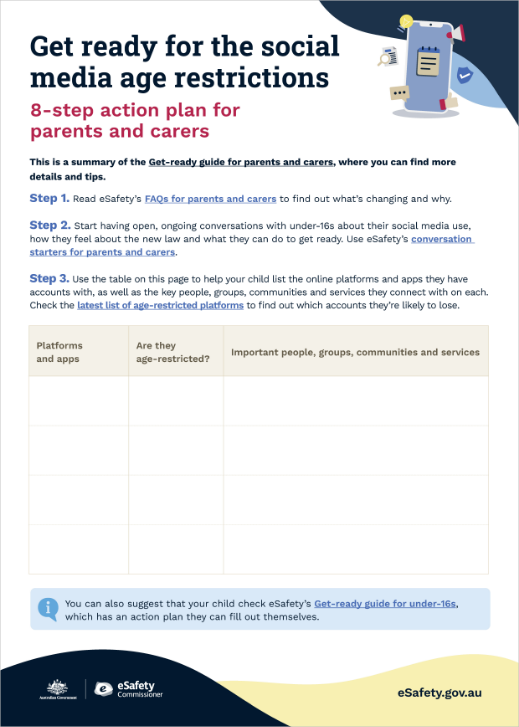
You can download or print the action plan at the end of this page, then fill it in together as a family.
Understand what’s changed and why
Find out what the social media delay means for under-16s:
- Age-restricted platforms include Facebook, Instagram, Kick, Reddit, Snapchat, Threads, TikTok, Twitch, X and YouTube. Find the latest list.
- Under-16s are allowed to see publicly available social media content that doesn’t need an account. They have access to apps and platforms that are mainly designed for online messaging and gaming, as well as online services that share health and educational information and support.
- Check our FAQs for parents and carers – this is being kept up-to-date with the latest official information.
- Visit eSafety’s social media age restrictions hub to learn more about the law.
- Talk about what's happening with your friends and community, as well as your child’s school, to see how they are dealing with it.
Start the chat
Have open, ongoing chats with your kids about online safety.
- For example, start by asking what they think of social media – the good and the bad – then go from there. eSafety’s conversation starters have lots of tips to help you.
- Talk about the law and explain why it’s happened. Help them understand it’s about protection, not punishment.
- Listen to what they have to say and talk about their feelings. Let them know it’s okay if they’re upset, confused or worried – these emotions are normal, especially for young people experiencing change or uncertainty.
- Reassure them that they’re not alone, many of their friends and families are navigating this change too.
- Let them know they can talk to you without judgement, or with a free, confidential counselling or support service – especially if they’re ever worried about their online safety or their health and wellbeing.
Help them map their digital world
Find out which platforms, people, groups, communities and services are most important to your under-16. Here are some questions you can ask:
- Which apps and platforms do you use the most?
- Who do you mainly connect with on these platforms?
- Which chats, groups, creators and communities have you lost access to?
- Were there any support services that you used via these platforms?
Encourage them to keep connecting with friends
Help them plan and organise alternatives with their friends:
- Suggest they make plans to catch up in person and explore offline activities – see our tips for balancing your time online for suggestions.
- Prompt them to ask close contacts for their phone numbers if they don’t already know them. But remind them they should never share phone numbers or other sensitive personal information in public posts or with anyone they don’t know in person – find out more about protecting your identity.
- Get them to ask friends for any gamertags or profile names on any other apps and platforms they use.
- Suggest they organise regular phone catch ups or stay in touch through an age-appropriate online chat or video app or by email.
- Encourage them to move group chats onto age-appropriate messaging apps. Help them download new apps if necessary, add trusted contacts and create new groups and chats.
Explore safer ways they can belong to communities
Get them to think about the communities they’re part of and how they can access those.
- Encourage them to make a note of their favourite influencers, streamers and celebrities (their account names/handles/gamertags) so they can look them up via a web browser.
- Help them search for alternative apps, websites or games that are high-quality, age-appropriate and related to their interests and life experiences – especially ones that encourage creativity, learning or mindfulness. Look for features like moderated chats, strong privacy settings and trustworthy news content.
- If they relied on social media for support, they could explore these ReachOut pages that have lists of national, state and territory-based services and ways to connect:
– Support services for Aboriginal and Torres Strait Islander people
– Ways to connect with community if you’re a First Nations young person
– Yarn up – a space where young First Nations people access wellbeing resources and support.
– Support services for culturally and linguistically diverse young people
– Culturally diverse LGBTQIA+ support services and groups
– LGBTQIA+ support services
Remind under-16s that even platforms which are not age-restricted can have risks. This means young people still need to know what to do about difficult situations like being cyberbullied or being asked for nudes, and how to protect personal information and report online harms. I need help is a good page for them to bookmark.
Visit our Parents section for more information on common online safety topics and check The eSafety Guide for advice on how to protect privacy and report harmful content on common platforms, games, apps and sites.
Help them save their digital memories
Platforms are meant to remove accounts belonging to under-16s. Instead of removing accounts, some platforms may deactivate them so they can be reactivated with all their existing data when the user turns 16. However, under 16s should not rely on platforms to provide this option. It’s best to download any data they want to save.
- They can take screenshots or download their favourite posts, chats, photos or videos (the platforms should provide instructions on how to do this, or you can check The eSafety Guide for help).
- Offer to help store them in a folder on a device or hard drive like a laptop or USB, or in cloud storage (you could give them access to a shared drive for this, if you have one).
- Each platform’s ‘Help’ or ‘Support’ section should have more information on what is happening to underage account data and content.
Start reducing your social media use together
If your under-16 still has any accounts on age-restricted social media platforms, they may still lose access to them before they turn 16. To avoid last-minute stress, discuss how they can begin winding back their social media use now – and make this a family effort by role-modelling the shift.
- Help them mute notifications, unfollow others and set goals to reduce screen time. (Make a conscious effort to cut back your own scroll time.)
- Encourage routines that promote a healthy balance, like taking regular breaks together from being online, creating device-free times and spaces in your home, and allowing more time for exploring offline activities together – see our tips for balancing your time online for suggestions.
- Use parental controls to help set limits and support balance – but first talk with your under-16 about what these controls mean, and (if possible) decide together how long they’ll be kept on.
- Discuss what to do about the use of shared devices or accounts in your family, household and other places your under-16 spends time, such as with another parent, grandparent or carer. Talk together about managing access appropriately.
- Celebrate progress each week, acknowledging your under-16’s shift towards more age-appropriate platforms and digital habits that support their safety and wellbeing.
Know where to find support
It’s important your under-16s understand that help is available – and that you know where to turn if you need help to support your child.
- Remind them they can always come to you or another trusted adult such as an older sibling, auntie or teacher if they’re finding it hard to deal with the social media change or any other issue.
- Let them know it’s also okay for them to contact a free, confidential counselling or support service like Kids Helpline (for 5- to 25-year-olds), eheadspace (for 12- to 25-year-olds), Beyond Blue (for all ages) or another one on eSafety’s counselling or support service list. They won’t get into trouble.
- Make sure they understand that if something goes wrong online they should reach out for help, even if they’re under 16 and on an age-restricted platform. Suggest they bookmark eSafety’s I need help page, or put this link somewhere they can always find it, like on your fridge: eSafety.gov.au/I-need-help.
- For many parents and carers, the changes may be a challenge. It’s important that you also reach out for help if you need it.
- ReachOut has advice: how to choose from a range of options (including talking with someone you trust, a counsellor or online support service, or a community forum). It also has coaching for parents and carers of teens, as well as advice on dealing with family conflict and helping young people cope with change.
- Here are some more support options:
– Counselling and support services
– Kids helpline
– Parentline
– Raising Children Network
– Family Relationships Advice Line
– A family mediation service
– Your child’s school counsellor or head of wellbeing or year coordinator
– Your local doctor or community nurse
Save an action plan
To help you support your under-16s, download or print the action plan and fill it in together. Or they can find their own version in the Get-ready guide for under-16s.
Join our webinars
Join our free 30-minute webinars to understand the changes to the social media age restrictions.
About this page
The information on this page was written in consultation with Beyond Blue, Headspace, Kids Helpline, Raising Children Network, ReachOut and eSafety's Youth Council.
Last updated: 22/10/2026