

Dealing with illegal and restricted content
This section outlines how you can take a proactive approach to preventing, detecting, moderating and reporting illegal and restricted online content if it appears on your platform.
You can build safety into the design, development and deployment of online products and services so that these online harms can be significantly reduced – and even prevented from occurring in the first place.
On this page:
- What is illegal and restricted online content?
- Understanding moderation, escalation and enforcement
- Limiting visibility
- Content moderation workflow guide
- Detection tools
- Enforcement mechanisms
- Implementing a standard operating procedure for content incidents
- Acceptable use policy
- More Safety by Design foundations
What is illegal and restricted online content?
‘Illegal and restricted online content’ refers to online content that ranges from the most seriously harmful material, such as images and videos showing the sexual abuse of children or acts of terrorism, through to content which should not be accessed by children, such as simulated sexual activity, detailed nudity or high impact violence.
The Online Safety Act (2021) defines this content as either ‘class 1 material’ or ‘class 2 material’. Class 1 material and class 2 material are defined by reference to Australia’s National Classification Scheme, a cooperative arrangement between the Australian Government and state and territory governments for the classification of films, computer games and certain publications.
Class 1 material
Class 1 material is material that is or would likely be refused classification under the National Classification Scheme. It includes material that:
- depicts, expresses or otherwise deals with matters of sex, drug misuse or addiction, crime, cruelty, violence or revolting or abhorrent phenomena in such a way that they offend against the standards of morality, decency and propriety generally accepted by reasonable adults to the extent that they should not be classified
- describes or depicts in a way that is likely to cause offence to a reasonable adult, a person who is, or appears to be, a child under 18 (whether the person is engaged in sexual activity or not), or
- promotes, incites or instructs in matters of crime or violence.
Class 2 material
Class 2 material is material that is, or would likely be, classified as either:
- X18+ (or, in the case of publications, category 2 restricted), or
- R18+ (or, in the case of publications, category 1 restricted) under the National Classification Scheme, because it is considered inappropriate for general public access and/or for children and young people under 18 years old.
Context is important when classifying material. The nature and purpose of the material must be considered, including its literary, artistic or educational merit and whether it serves a medical, legal, social or scientific purpose.
This means it is unlikely that sexual health education content, information about sexuality and gender, or health and safety information about drug use and sex will be considered illegal or restricted content by eSafety.
How can this type of content lead to harm on an online platform?
Harm can occur during the production, distribution and consumption of content.
- Production of content – for example, where a person being harmed is filmed or photographed and that material is live streamed or posted online. This could include images or videos of murder, assault or child sexual abuse.
- Distribution and availability of content – for example, where an intimate image or video of a person is shared online without their consent (known as image-based abuse or ‘revenge porn’), or material that shows abuse. This can add to the trauma experienced by the person who is in the image or video. It can also be distressing to those who see it.
- Consumption of content – for example, where a person’s mental health is negatively impacted after viewing illegal, age-inappropriate, potentially dangerous or misleading content.
Introducing procedures and tools that help prevent, detect and moderate illegal and restricted online content at any of these stages, as well as having options for users to report an incident on your platform, means you can design and develop your online services with safety in mind.
It also means your organisation can know how to act quickly when something goes wrong, keeping users safer and improve workflows for future incidents.
Online abuse, such as cyberbullying, cyberstalking and online hate, are other types of harmful online content that can happen on your services. Learn more about how online platforms can be misused for online abuse, including who is most at-risk and how you use Safety by Design to help you develop safer solutions for your users.
Understanding moderation, escalation and enforcement
It is becoming more of a requirement from government and regulators around the world to detect and remove illegal and restricted online content. For example, Australia’s industry codes and standards put in place requirements for the detection of known child sexual abuse material, as well as pro-terror material.
It is vital that harm prevention and detection processes are implemented across all surfaces of your platform to help keep your users safer through moderation, escalation and enforcement.
About moderation
You can start by setting up moderation tools in the early stages of your product design and development. Investing in processes that are diverse and far-reaching across your services can have the biggest impact, ensuring that illegal or harmful content and behaviour is identified and addressed quickly.
Use our content workflow moderation guide to help you introduce moderation tools to your service at different stages, as well as advice on limiting visibility.
About escalation
You must establish robust escalation pathways to address illegal and restricted online content. This includes implementing accessible user reporting mechanisms and well-defined internal and external triage processes to ensure harmful content is swiftly escalated to the appropriate authorities.
To support timely and effective action, minimum service level agreements (SLAs) should be in place, alongside clearly defined success metrics for reviewing and responding to user reports and detected violations.
About enforcement
Enforcement refers to the actions a company takes when accounts or content breach its policies. To enforce policies targeting illegal and restricted content, you should implement referral protocols to law enforcement and specialist hotline, while being mindful not to overwhelm these channels.
Proactively seek feedback from these stakeholders to ensure your reporting methods are practical, actionable, and aligned with their operational needs. Relevant organisations, frameworks and resources include:
- The Incident Response Framework developed by members of the Global Internet Forum to Counter Terrorism (GIFCT), which provides structured guidance for responding to violent extremist content online.
- The Tech Coalition offers guidance for child safety online, including reporting to law enforcement.
It is important to make sure regular reviews about your prevention, detection, moderation and reporting processes take place at your organisation, including at company board and leadership meetings.
Limiting visibility
There may be times when you need to limit the visibility of content on your platform for user safety, either for a certain amount of time or as a standard practice.
This could include content that is sensitive to some audiences, such as adult themes that are not suitable for children on the platform, or graphic content. It may also be content coming from a high-risk source, such as a user with multiple past violations against community guidelines.
Some options for limiting visibility of content include:
- down-ranking
- sensitive or graphic content warnings, including blurring images
- limiting searchability
- age-restricted content – this could include using labels to restrict viewing to adults.
- restricted content from being shared with a large number of people instantly.
Learn more about community guidelines and community moderators in our page, Empowering users to stay safe online.
Content moderation workflow guide
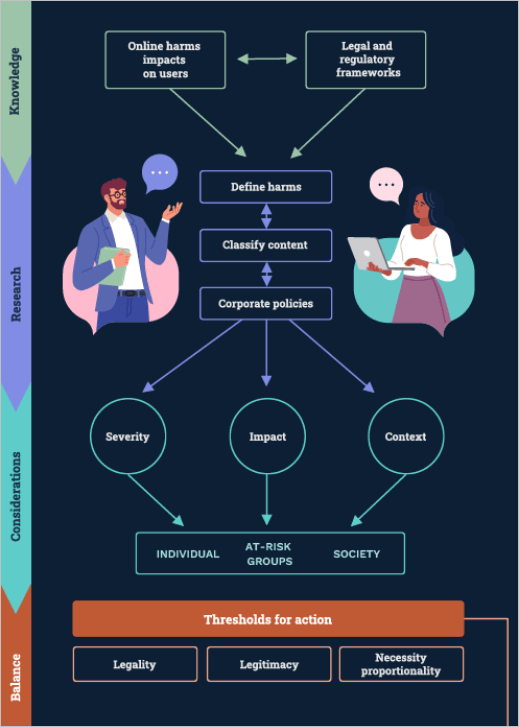
Moderation teams can use eSafety’s content moderation workflow guide to help introduce tools into the design and development stages of your product or service.
Teams will need to have a clear understanding of what content is harmful, what content is illegal, and the legal and regulatory frameworks that need to be considered and built into the workflow.
You can also read more about Australia’s legal and regulatory frameworks for online safety on our Industry regulation page.
Download the content moderation workflow
Detection tools
Technologies for preventing online child sexual abuse
New technologies have proven to be critical in protecting children from sexual abuse, and ongoing re-victimisation from repeated sharing of abuse material. More sophisticated tools help to detect grooming conversations and child sexual abuse material so platforms can prevent the sharing of illegal material and report offenders to authorities.
Different software and technologies can help services detect, review, report and triage illegal content while minimising human exposure to traumatic material. These include machine learning, hash-matching tools, web-crawlers, video fingerprinting, investigatory toolkits, visual intelligence tools, and image classifiers.
Click or tap on the + to read case studies about the tools created by Microsoft, Google and Thorn and how they can be used by other online service providers.
PhotoDNA
PhotoDNA is an image-identification technology used for detecting child sexual abuse material and other illegal online content. Developed by Microsoft and Dartmouth College in 2009, it works by creating a unique digital signature or ‘hash’ of an image, which is then compared against the hashes of other photos to find copies of the same image.
Hashes are then compared against databases of known abuse material, comparing hash to hash. This comparison is undertaken to detect, remove and limit the distribution of harmful content. PhotoDNA focuses on comparisons between images and does not use facial recognition technology, so it can’t be used to identify a person or object in an image. A PhotoDNA hash is also not reversible, meaning it cannot be used to recreate an image.
Microsoft donated PhotoDNA to the National Center for Missing and Exploited Children (NCMEC) and continues to provide this valuable technology for free to qualified organisations including technology companies, developers, and not-for-profit organisations. Microsoft has also provided PhotoDNA for free to law enforcement, primarily through forensic tool developers.
PhotoDNA has been widely embedded into innovative visual image and forensic tools used by law enforcement around the world. It has assisted in the detection, disruption and reporting of millions of child sexual abuse material images and videos and is used by more than 200 companies and organisations around the world.
Google Content Safety API
Google Content Safety API classifier uses programmatic access and artificial intelligence to classify and prioritise previously unseen images. The more likely the image contains abusive material, the higher priority it is given.
While historical approaches have relied exclusively on matching against hashes of known illegal content, the classifier keeps up with offenders by also targeting content that has not been previously confirmed as child sexual abuse material. Quick identification of new images means that children who are being sexually abused today are much more likely to be identified and protected from further abuse.
Content Safety API can help reviewers find and report content seven times faster. Making review queues more efficient and streamlined also reduces the toll on the human reviewers, who review images to confirm child sexual abuse material.
Google offers this service for free to companies and organisations to support their work protecting children.
You can also read more about Google's recommended review flow using its Content Safety API.
Google CSAI Match
Google CSAI Match, developed by the YouTube team, uses hash-matching to identify known video segments that contain child sexual abuse imagery (CSAI). The tool will identify which portion of the video matches known material, as well as categorising the type of content that was matched. When a match is found, it is then flagged for YouTube or partner organisations using the tool to report in accordance with local laws and regulations.
Google makes CSAI Match available for free to non-government organisations and industry partners who use it to counter the spread of online child exploitation videos on their platforms.
Safer
Safer is designed to help companies hosting user-generated content to identify, remove and report child sexual abuse material at scale. Safer was developed by non-profit organisation Thorn and builds on the use of image hash-matching by using two types of hashing – cryptographic and perceptual hashing – as well as classifiers.
Cryptographic hashing can detect two files that are exactly the same without having to look at the material itself.
Perceptual hashing can detect similar files, identifying images that have been altered so they are not picked up by monitoring tools.
Classifiers use machine learning to automatically sort data into categories. For Safer, classifiers are trained on existing data to predict whether a new image is likely to be child sexual abuse material.
Once an image has been hashed, it can be compared to the existing hashes in the National Center for Missing and Exploited Children (NCMEC) database and SaferList. New hashes reported by Safer customers are also added into the system for others to match against. That means that Safer can flag an uploaded image that might be child sexual abuse material in real-time and at the point of upload.
Thorn reports that Safer can detect with greater than 99% precision.
Internet Watch Foundation’s URL list
The Internet Watch Foundation (IWF) has a dynamic URL list of webpages with confirmed child sexual abuse material.
All IWF members can use the list, under licence, to block access at the URL level, rather than the domain level. The lists are updated twice per day.
Internet Watch Foundation and Lucy Faithfull Foundation’s chatbot
The Internet Watch Foundation and the Lucy Faithfull Foundation has developed a chatbot that targets platform users who are showing signs that they might be looking for images of child sexual abuse. Deployed on Aylo, when a search uses a banned term, the chatbot appears as a pop-up, along with a warning message. The chatbot warns users about their illegal behaviour and signposts them to Lucy Faithfull Foundation’s Stop It Now service, where they can get help and support to stop their behaviour.
An independent evaluation by the University of Tasmania found that the chatbot was successful in deterring people from searching for child sexual abuse material on Pornhub.
Hash database for terrorist and violent extremist activity
The Global Internet Forum to Counter Terrorism (GIFCT) host a shared Industry database of perceptual hashes with signals of terrorist and violent extremist activity found across different platforms. This database enables companies to share signals about terrorist content they have identified on their platform so that other members can later identify if the same content is shared on their platform, Online providers can then assess it in line with their policies and terms of service.
Text moderation APIs
There are a variety of text moderation application programming interfaces (APIs) that can be used to filter and remove harmful text in comments, posts and messages. This can include filtering for hate speech, harassment, self-harm and suicidal thoughts, sexual references, drug references and more. The APIs can ensure content is moderated in real time, preventing harms from happening.
Enforcement mechanisms
Enforcing terms of service is key to sustaining a healthy and safe online community.
There are many measures and mechanisms available to platforms to ensure that breaches of community guidelines are addressed quickly and consistently. Expanding and developing new ways that breaches are enforced, such as warning systems and penalties, will achieve a positive outcome.
Click or tap on the + to read more about some of the options you can use on your platform.
Warning systems
- In-app warning
- In-chat warning
- In-video warning
- In-stream warning
- In-game warning
Account suspensions
- Temporary
- Access to certain platforms
Account bans and blocking
- Feature and functionality blocking
- Machine IP blocking
- Demonetising and removing the ability to promote content
- Geo-blocking
- Ban across all platforms
An example of a ban across multiple sites or services is Match Group’s safety policies. They will ban a user – and all their accounts – if they have been reported for domestic abuse, assault or criminal activity from using any Match Group platform.
Progressive strike system and penalties
A progressive strike system is when users accrue strikes or points against their account each time they violate the community guidelines. As strikes accrue this may lead to:
- temporarily or permanently removing privileges, such as monetisation, the ability to live stream or chat, or credibility badges
- temporary account suspensions
- permanent bans.
These can be proportional to the harm posed. For example, posting or sharing child sexual abuse material just once should result in an immediate account ban (alongside reporting requirements).
Preventing re-registration and fake accounts
Stopping online abusers from re-registering on a platform or service – once they are blocked – is a key enforcement strategy. The registration of fake or bot accounts is also often used to evade moderation and enforcement processes.
Information and evidence capture
When a user registers and interacts with a platform or service a significant amount of information can be captured. This can potentially be used to identify and stop re-registrations or fake accounts from occurring.
Web identifiers
- Cookies
- Local storage super cookies
- IP addresses
- Browser fingerprinting
- Detecting when VPN services and other obfuscation techniques are used
- Geographical indicators
Device and hardware identifiers
- Phone numbers
- IMSI and IMEI numbers
- Advertising IDs
- MAC addresses
- Device and machine fingerprinting
Other identifiers
- User behaviour analysis to detect unusual account activity
- Account analysis for duplicate or near-identical account names, avatars or profile pictures
- Metadata and traffic signals analysis
- Repeated use of services such as email for registration purposes
- The utilisation of disposable email and mobile phone numbers (for two-factor authentication)
- Payment information such as credit card details
Account information
- Usernames
- Name
- Date of birth
- Display name
- Profile picture
Remember: Obfuscation techniques such as VPNs to hide an IP address are often used, so consider using multiple identifiers.
Prevention techniques
When certain information is captured, re-registration or fake accounts can potentially be blocked using one or a combination of the following techniques:
- IP address or device blocking
- Client-side cookies
- Rate limiting or real-time bot detection
- Geofencing
- Identity verification methods such as image or ID upload
- ReCAPTCHAs
- Automated bot prevention tools.
Implementing a standard operating procedure for content incidents

There are increasingly more regulations around the world requiring concrete measures to tackle the upload and spread of harmful content online.
The implementation of standard operating procedures (SOPs) for content management, particularly content incidents (including illegal content or activity and online crisis events) can greatly assist in the quick removal of content and mitigation of harm, locally and globally.
Escalation processes should seek to establish a clear and collaborative means of notifying local law enforcement, online harms regulators, illegal content hotlines and support services that work with illegal and harmful content.
Online communities are only as safe as the most vulnerable – prioritising the safety of at-risk and marginalised groups helps to create safer spaces for everyone.
Learn more about how internal operational guidelines and risk assessments support enforcement.
Steps for developing an incident response plan
An incident response plan should be created and updated about different types of online safety incidents. These plans should include information about incidents that are being, or have been, investigated, resolved, recorded in a register, and isolated to minimise risk.
Your incident response register should document key details about an incident and provide timeframes for responding – particularly when responding to illegal content.
Make sure that incident response plans are clear and easily accessible for all employees, including contractors.
You could also create case studies based on previous incidents that have happened to make your plan more practical.
Click or tap on the + to find advice about what you can do before, during and after an incident has happened.
Pre-incident
Step 1. Determine
1. Develop definitions:
- Clearly define what is classified as a content incident or crisis event.
- Decide on appropriate labels (such as crisis, high-impact, medium-impact, low-impact).
2. Set out how you will monitor your platform to identify and detect incidents:
- The public, government, industry or internal mechanisms may all provide channels for the identification of content incidents.
3. Set out who you will collaborate with during an incident:
- Law enforcement, both nationally and internationally.
- Other platforms and service providers such as services on which unlawful or harmful content has spread or there are cross-platform attacks, known as volumetric or pile-on attacks. Examples of how this can be achieved are set out in the Australian Government’s Basic Online Safety Expectations regulatory guidance, on pages 50-52.
- Relevant non-government organisations such as the Global Internet Forum to Counter Terrorism (GIFCT).
- Regulators and national and international governments.
4. Determine timeframes for review and escalation required by both internal and external parties.
In-incident review
Step 2. Detect and assess
1. Know how you will detect and flag incidents.
2. Assess incident impact – including volume, format and type:
- Identify the potential for the content to go viral – both across your platform and across other platforms.
- This includes an assessment of its geographical scope and the speed with which the online content may spread or has already spread.
3. Classify the incident as crisis, high-impact, medium-impact, low-impact:
- Flag whether the incident is still active/in progress
- Keep a record of incident assets and links, and document the situation.
Step 3. Notify
- Consider which internal staff and/or teams should be aware of the content incident (such as safety strategy and operations leads, CEO, COO, legal team etc).
- Consider which external stakeholders should be notified of the content incident (consider voluntarily notifying identified stakeholders to contain the crisis as quickly as possible across platforms).
- Consider legal requirements for notification, such as reporting child sexual abuse material to the National Centre for Missing and Exploited Children.
Step 4. Act and manage
1. Develop and implement an action plan outlining how you will deal with incidents of differing severity.
2. Take action:
- If the incident is affirmed as a crisis, take immediate action on relevant assets including, but not limited to: blocking access to content, suspending accounts, ingesting hashes and removing content.
- If the incident is classified as medium to low-impact, take whatever action is considered appropriate in the circumstance – this may include moderating, limiting access to content, cautioning account/s, blocking and ingesting hashes.
3. Maintain open lines of communication with incident partners.
4. Continually review content and reassess the situation – assessing the content type, format and assets involved:
- Monitor the incident as part of situational awareness – both on platforms, in the media and whether the incident is still active/in progress.
- Communicate to users – even if it is a holding comment once an incident is in the public domain, and ensure that you offer links to support services in any messaging.
Step 5. Report and record
1. Provide ongoing reports internally and externally on incidents while they are active.
2. Keep a detailed record of all actions undertaken to remedy incidents.
3. Collect and record any evidence to support further analysis or investigations: Ensure that evidence is securely stored and handled by nominated staff only, recording all details of evidence transfers.
Post-incident
Step 6. Post-incident review
Review and evaluate incident responses, identifying what worked and opportunities for learnings:
- Adjust and update internal and external procedures as required.
- Document key learnings and insights arising from incidents.
- Update SOPs to improve pre-incident and in-incident responses and protocols.
Other resources that may be helpful when planning responses to content incidents, include:
Acceptable use policy
An acceptable use policy outlines the practices and constraints a user must agree to before they use or access a platform or service.
This policy is critical and an asset to your organisation.
It should take into account human rights, the rights of children and cover a broad range of illegal or harmful content and behaviour.
Australia’s industry codes and standards also put in place requirements for the clarity and accessibility of terms of use, as well as responding to certain harmful material.
As a baseline, an acceptable use policy should seek to cover a broad range of illegal content. It can expand to include other factors as the platform or service evolves, such as:
- minimum age or consent
- bullying and harassment
- hateful content and conduct
- threats to individuals
- suicide and self-harm
- misinformation and disinformation
- manipulated media (such as deepfakes)
- impersonation
- fraud
- spam.
It is important that the acceptable use policy is reviewed, evaluated and updated following an incident, on a routine basis (for example, quarterly) and after a major update to your platform. Making sure the policy is regularly reviewed and updated can help maintain online safety on your platform.
Also make sure the acceptable use policy is easily accessible for all staff and that they are notified of any updates.
It is crucial to have training and awareness of the policy at your organisation. It should be implemented from the earliest stages possible for all employees, including contractors.
Learn more about how to raise awareness and improve your employees’ understanding of the policy in our page, Embedding safety in internal policies and procedures.
More Safety by Design foundations
Continue to Creating transparency frameworks to learn how transparency and consultation can strengthen accountability and user trust.
Or, explore these other modules:
Last updated: 29/09/2026